


How to Use AI in Software Development: A 2026 Guide with Real UK Examples
Use AI in software development to identify and predict where the system could fail based on past failures. That way, you can have a software process that stops if risk crosses a set limit.
Skipping AI in software development can lead to a productivity gap
Part of the reason is that teams invest time in reviewing, testing, and refactoring, which still burns up human hours. Adopting AI can reduce those steps, with AI assistants completing tasks 55.8% faster than those who do not use AI.
The market is projected to become more competitive, growing at a CAGR of 11.1% to reach £72.1bn by 2027.
More on it below.
The Efficient Way to Use AI in Software Development
Evidence shows that leading systems now complete code work that would take a developer 20 minutes or more with about 80% reliability.
Also, Stanford’s 2024 benchmarks show that AI systems can now solve approximately 71.7% of complex software issues that previously required manual debugging.
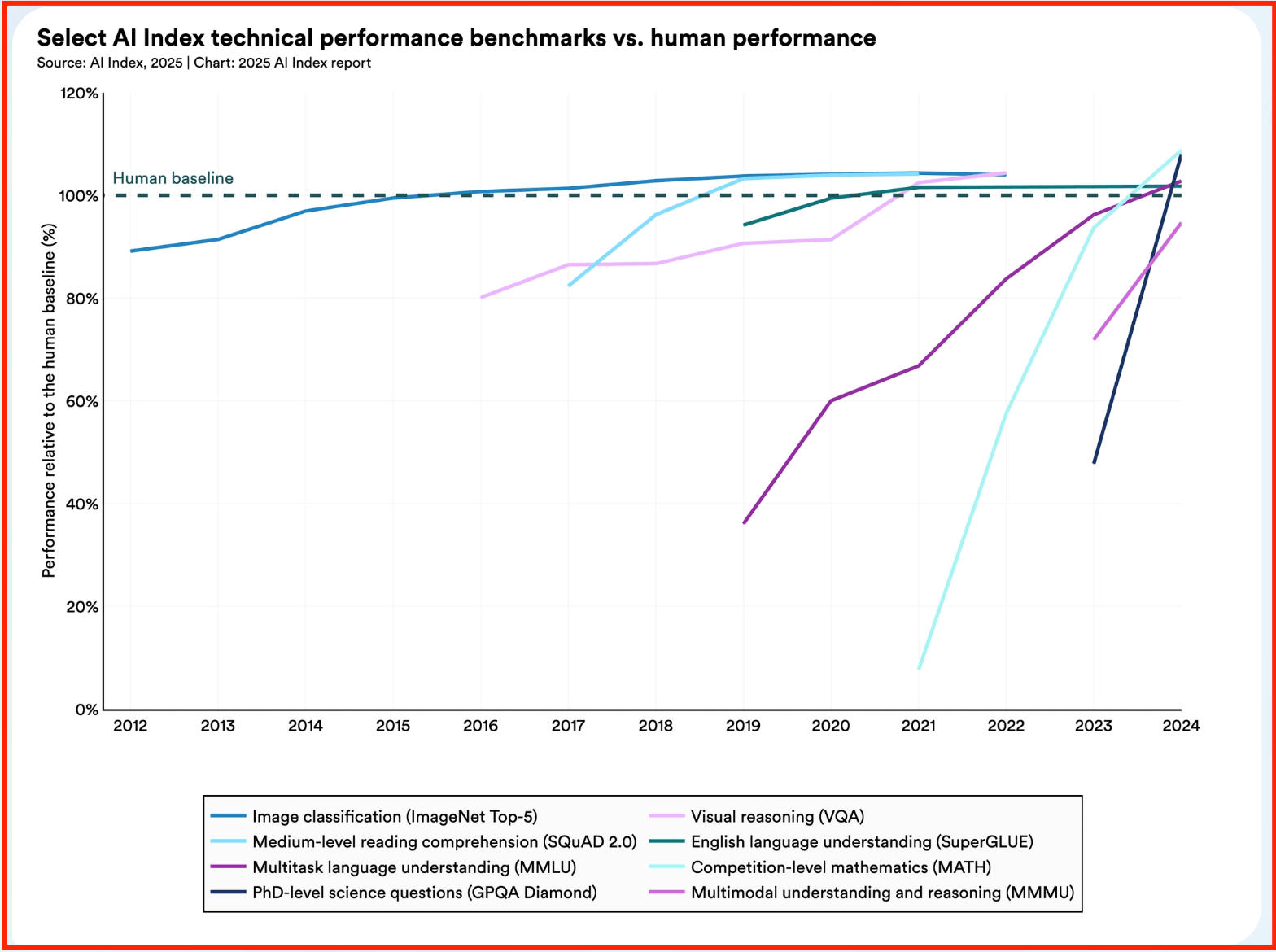
Adopting AI early in the software development lifecycle gets you to reshape decisions and run checks to detect failures when changes are cheapest.
Here is what it takes to implement AI across the development stages:
A. Identify Where AI Fits in the Modern Software Development Lifecycle
AI changes software outcomes only when you use it early enough to catch mistakes and preserve hard-won knowledge.
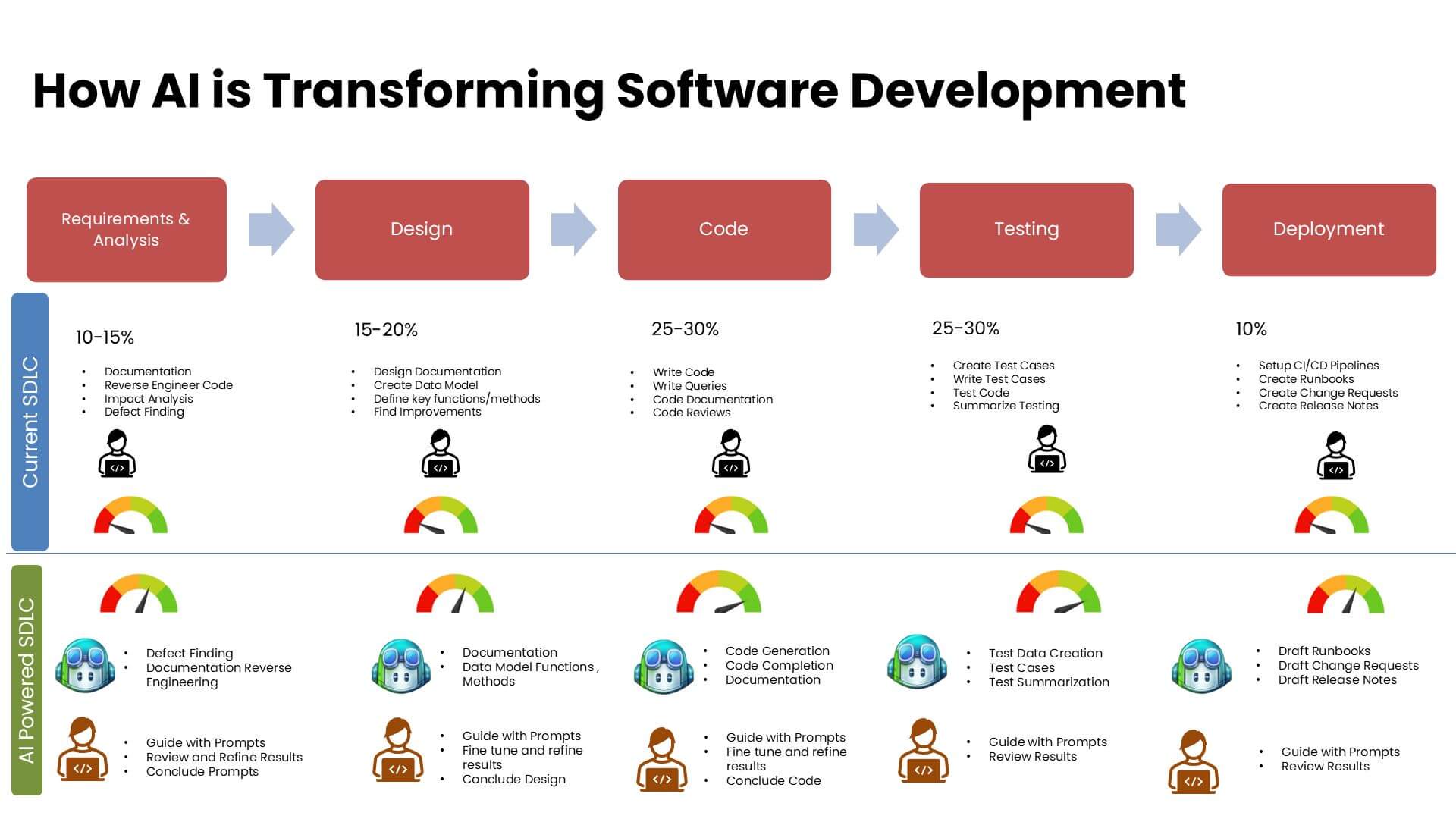
Adopting AI in software development can save minutes writing codes but using it to prevent failures could save months.
I. AI as a Development Support Layer
AI as a development support layer, checks for changes that could cause problems in code.
For example, studies show that developers using AI assistance complete routine coding tasks faster. But the real gains come from review and testing, where defect detection improves and rework drops.
Get started with this by —
- Identifying features that historically cause the most bugs by feeding requirement documents and your past 2 years of bug reports (Jira/GitHub issues) into an AI model
- Automating code reviews for breakage by using tools such as CodeRabbit, CoderAI, or a similar AI review agent that runs in your version control system (such as GitHub or GitLab)
II. Humans-in-Loop for Architecture and Decisions
AI helps build architecture-level thinking by exposing risks and constraints. Humans make the final call on structure and tradeoffs. What follows is a series of human-led decisions to make sure long-term system behavior remains intentional.
To get started:
Compare new ideas by matching them to your existing system with the use of prompts that answer questions such as:
- Which parts of software may become harder to change later?
- Which existing development components will now handle more load?
- Which services gain new dependencies?
It’s fine for businesses to consider the impact before granting approvals, because risks can emerge during implementation.
For example, AI can report that adding synchronous calls will raise response time during peak traffic based on past incidents or logs.
III. Extracting Tribal Knowledge
Every team maintains a set of documented information. These are often buried under old chat threads or review comments. Before AI implementation for software development, collect and standardise this information.
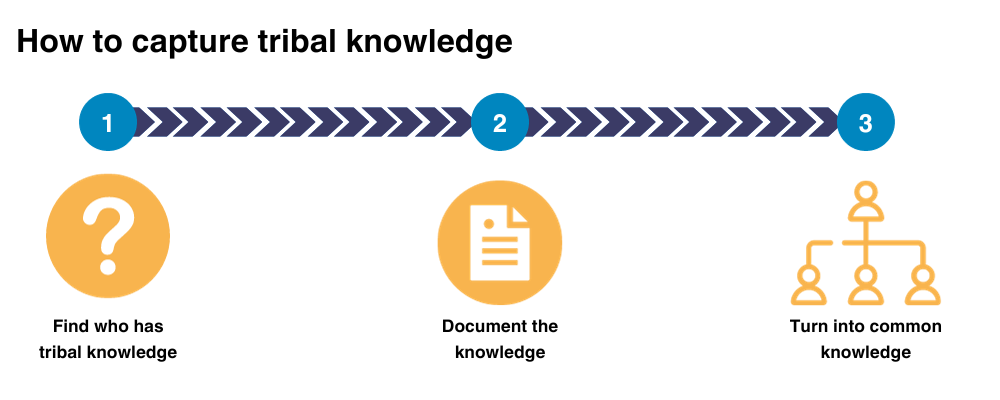
It involves reasoning that never made it into code or documents.
Implement this by:
- Collecting the right historical material: Start with sources that explain mistakes by pulling the last 12 to 24 months of incident reports, postmortems, major bug tickets, and rejected pull requests. Research shows most production incidents are repeats of known failure patterns, not new issues.
- Creating onboarding maps: When a new developer joins, let the AI generate a visual map of the system based on the commit history. AI can track which files each person edited most frequently and create a directory of whom to ask.
B. Building an Engineering Culture that Remains AI-Native
According to a Gartner report, nearly 90% of engineers are expected to use AI assistants by 2028. Which means just having an AI tool in software development won’t suffice. To really drive competitive advantage, you need your teams to your integrates it into their daily habits.
Building such a culture requires you to:
I. Deploy a Digital Team
Instead of broad AI assistants, provide developers with digital teammates for specific high-stakes tasks such as —
- Checking security risks
- Drafting internal docs from code changes
- Monitoring incoming issues and linking them to past failures
- Validating code changes in real-time and automatically updating the internal documentation
II. Set the Sign-Off Rules
Define exactly where the AI stops implementing and where the human’s responsibility begins. Developers can have AI draft the logic, with a mandatory human sign-off for high-risk changes.
For this:
- Define what AI is allowed to block by picking a small set of high-risk conditions, such as changes around payment logic or data deletion
- State when a human must step in so that the task owner can review AI findings and approve/reject the change
III. Building a RAG (Retrieval-Augmented Generation)
RAG enables the AI to answer questions using your own seed material rather than relying on general training.
Start with sources that capture decisions and failures by using —
- incident reports
- major bug tickets
- rejected code changes
- design notes
- internal rules
If a document does not explain why something broke or why a rule exists, it adds little value.
C. Using AI During Planning and Requirements Engineering
Research from Thoughtworks shows that using AI for repetitive verification tasks, such as generating test data, can save a team 15%-50% of its time.
For you, this translates directly into a faster time-to-market, with some companies seeing up to a 30% improvement in how quickly they can launch a product.
Get started with this by —
I. Letting Developers Retain Design and Logic Ownership
Ensure developers decide and document the rationale for each feature to prevent the software from drifting into behavior that no longer solves the original problem.
Action items:
- Writing the intent requirement before estimates or coding
- Lead developers approve the written intent before the AI generates code or tests
- Updating the written intent before continuing development to avoid changes in behavior
II. AI outputs remain advisory
Make AI your high-speed consultant. The one who offers options and highlights risks or gaps. It’s the skilled team that decides what to accept, preventing speed from overriding judgment and ensuring intentional decisions.
Make this possible by:
- Mandating the multi-option proposals for complex features by instructing your team to generate at least two different implementation paths using AI
- Enforcing a human decision for any AI-generated recommendation that affects behavior, data flow, security, or performance.
- Letting developers add a brief note to their work explaining why they chose the AI’s specific suggestion
III. All AI-generated code is reviewable and reversible
Small and clearly labeled AI contributions prevent a single automated error from tangling your entire codebase or causing a long-term system failure.
To make this happen:
- Track which code changes involved AI assistance within version control
- Enforce the same review standards for AI-generated code as for human-written code
- Ensure all AI-assisted changes can be rolled back cleanly without special handling
D. Lifecycle Stages Where AI Is Actively Applied
Know where AI speeds up the process and how software development can leverage human expertise to protect an investment.
A significant 99% of organizations that have implemented DevOps have reported positive effects.
There are four key aspects to this:
I. Planning and Requirements
Start by defining what tasks the software will perform. Here, AI acts as an analyst to catch missing details in a business plan before they become costly coding mistakes.
It includes:
- Generating user scenarios to turn a simple feature idea into a list of ways in which a user might interact with it
- Checking for logic gaps by having AI scan the project requirements to identify missing pieces, such as what happens if a user loses internet connection during a payment
- Estimating the effort and risk by letting AI compare new requirements with similar past projects to provide a more realistic timeline
II. Code Development and Refactoring
It’s a building phase where AI handles the heavy lifting of writing standard code (development) and cleaning up old code. Untidy code to make it faster and easier to maintain (refactoring).
Here, AI can help:
- Draft boilerplate code that’s usually standard for login screens or data tables
- Simplify complex logic that consumes excessive memory or processing power and turn them into cleaner versions
- Explain how the existing code works in plain English so they can start contributing faster
III. Testing and quality assurance
AI can verify that the software behaves correctly before release by identifying untested paths and generating tests likely to fail.
Applause’s The State of Digital Quality in Functional Testing 2025 report suggests that 60% of respondents reported their organisations use AI in the testing process.
Some of the use cases involve:
- Creating realistic test data by generating thousands of dummy user profiles and transactions to see how your app handles a large crowd
- Writing automated test scripts that automatically check for bugs every time a change is made
- Predicting where bugs will hide by analyzing the code and pointing out the weaker spots where errors are most likely to happen, based on the complexity of the logic
The UK Companies Example That Used AI to Build Software
Let’s take a quick look at some of the real examples of businesses that used AI in software development. We’ll also explore how they implemented it and the results they achieved, which help set benchmarks for growing firms by learning from industry data.
1. UK Government Digital Service (GDS)
For the GDS, the AI code assistants were embedded directly into developers’ existing coding and review workflows. Engineers had AI draft routine code and to understand legacy systems, leading to faster reviews.
Ultimately, humans retained approval and release control, as discussed earlier.
What AI achieved: AI reduced time spent on repetitive implementation work, allowing engineers to focus on system design and policy logic.
Outcome: Each developer saved almost one hour per day, equivalent to 28 working days per year per engineer.
2. JPMorgan Chase
While this is an enterprise-grade implementation, it does provide us with a use case for what a successful AI implementation in software development looks like.
For this one, JPMorgan Chase had an internal AI coding assistant integrated into the development and review stages. Also, there were strict human sign-off and rollback controls.
What AI achieved: Engineers had to spend less time on routine, standard code work. Instead, they got to focus on high-value changes with AI presenting potential issues early.
Outcome: Reuters reported that the bank developed a coding assistant tool, which resulted in 10–20% efficiency gains across engineering teams.
3. UK Public Sector Engineering Teams
Multiple UK public sector teams used AI tools to automate repetitive engineering and operational tasks. These tools were integrated into existing systems rather than replacing them.
What AI achieved: A drop in manual efforts for tasks that needed validation and issue triages.
Outcome: Research shows AI could prevent 30.6 million hours of lost work per week caused by inefficient processes across the UK public sector.
4. allpay
allpay used AI to handle the increasing complexity of its payment infrastructure. AI suggestions flowed into normal pull request and review processes, with human approval remaining mandatory.
What AI achieved: Developers spent less time on repetitive tasks and more time reviewing and improving code with GitHub Copilot. It automated generating repetitive code and helped write unit tests for their payment processing systems.
Outcome: There’s a reported increase in productivity and delivery volume by Microsoft:
- 10% increase in overall developer productivity
- Up to 80% time savings on specific coding tasks
- 25% increase in production releases within nine months
Ready to Use AI for Software Development
A part of using AI in software development involves deciding where the technology can have the greatest impact. Not all software development is the same, so AI implementation will differ across businesses.
If you’re looking to make the best use case for developing your software, you may be well off consulting the experts at QuantumXL for AI development services.
Before the kickoff, we sign an NDA and later help you set goals to unlock efficiency – Get in touch with us now!