


How to Create an AI Chatbot That Aligns With Your Business Goals
Creating AI chatbots is simpler than ever. You can now plug into providers like OpenAI, Anthropic, and Microsoft Azure without lengthy vendor approvals or infrastructure setup to build your own chatbot.
This approach explains why 45% of UK businesses now use AI chatbots for various business processes.
While you may learn how to create a chatbot, it should also reflect your specific business logic. This often means connecting an AI to your company’s actual information and complying with industry regulations.
In this guide, we’ll explore how to build an AI chatbot in a structured manner.
How to Make an AI Chatbot: Step-by-Step Framework That Delivers Results
If you’re looking for an answer to how to build a chatbot, then we’ve got it covered in these seven steps below.
Step 1 – Define the Business Objective Before Defining the Bot
Adobe reports that companies that explicitly link AI projects to core objectives are 65% more likely to achieve measurable ROI than those in a testing phase.
Instead of asking what the bot should do, shift the inquiry to what business problem it solves.
To begin:
Clarify the core outcome
Decide what you want the chatbot for.
Think in lines of:
- Conversion: nudging a visitor from consideration to purchase
- Bringing down the support cost: deflecting repetitive tickets before they hit a human agent
- Customer retention: catching churn signals early through proactive check-ins
- Onboarding: walking new users through setup without a support representative
Differentiate between business objectives and chatbot features
A feature is what the bot does. An objective is why the business needs it. Start by listing desired features, each with a defined, specific metric it impacts.
Identify the primary user segment
What you want to achieve by building this AI chatbot is to provide users with accurate information that addresses the intent behind the conversation.
Vodafone’s sub-brand, VOXI mobile, built its LLM chatbot specifically for its user base (Gen-Z — aged 16-29) by customising the bot’s tone and scope to reflect a specific user set rather than a general audience.
Step 2 – Identify the Exact User Problem the Chatbot Will Solve
Know precisely where users get stuck (and why) before you map a single conversation flow. Otherwise, people will have to repeat. In fact, 39% of customers cite having to repeat their issue to multiple agents as their biggest support frustration.
Cultivate Jobs-To-Be-Done (JBTD) thinking
Clayton Christensen developed the JTBD framework at Harvard Business School around one core idea: people don’t buy products, they hire them to get a specific job done.
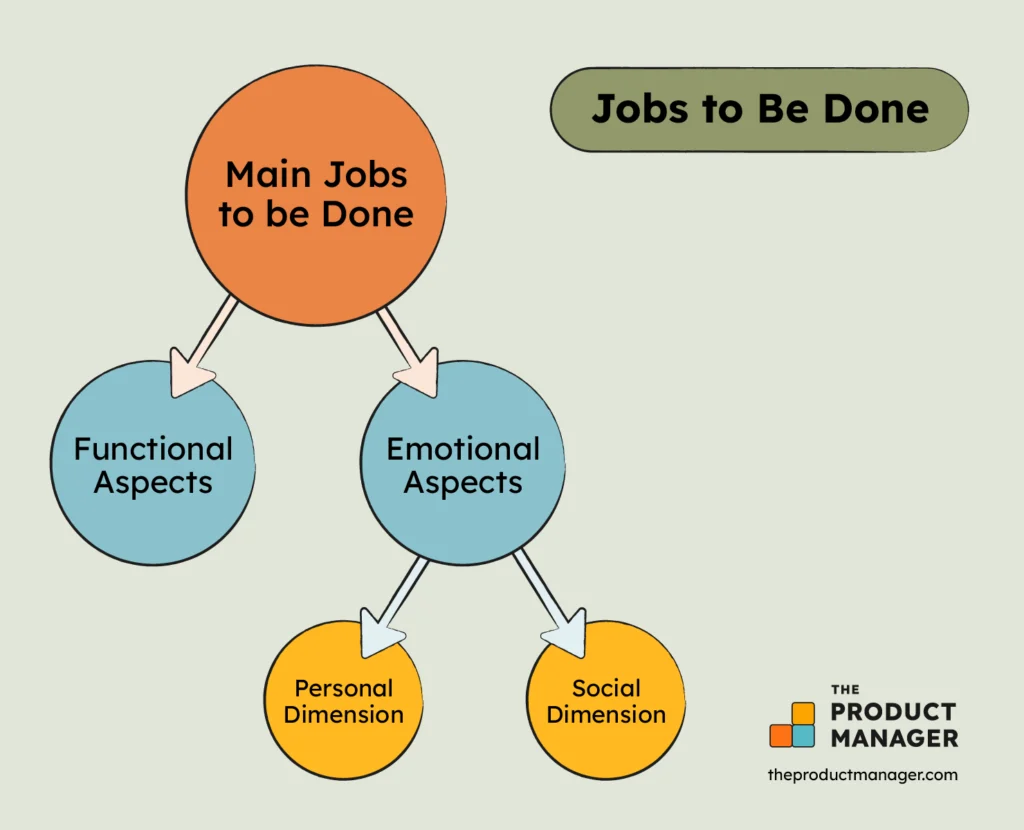
Applying this while building an AI chatbot would mean removing assumptions about what an AI should do and instead identifying what logical progress (the job) the customer is trying to make.
To apply JBTD while building an AI chatbot:
Reduce cognitive load: A bot aligned with JTBD offers a limited menu of options and uses the user’s current page or account status to predict the most likely job they are trying to complete.
Write job statements in this format: When [situation], I need to [to this job], so I can [achieve this outcome].
Define user context — where, when, why
The same user has completely different needs depending on where they are in their journey, so it is important for the bot to understand the context before responding.
To begin defining context, map context across three dimensions:
- Where: The page or screen where the conversation starts.
- When: Time of day and lifecycle stage change what a good response looks like entirely.
- Why: The emotional trigger behind opening the chat. Think — frustration vs. curiosity, which needs completely different first responses.
Simplify the entry points
Map the entry points through which users start interacting with the AI chatbot by:
- Pulling your top support ticket categories and reviewing the highest-signal entry points
- Identifying pages or product screens that generated the most tickets to make sure your AI chatbot remains there and leads
- Trigger and the single best next step for each entry point that the bot offers
- Test entry point assumptions against real session recordings using tools like Contentsquare’s heatmaps.
Decide on replacing or assisting human workflows
A bot can own repetitive workflows cleanly and hands off complex ones immediately to humans, who again use AI to generate precise responses faster.
- List every workflow your support or sales team handles weekly
- Score each one: how often does resolving it require human judgment?
- Low judgment + high volume ⇢ perfect for replacement
- High judgment + high value ⇢ perfect for assistance
Algo’s support agents use AI to pull the most relevant technical information by triggering RAG (Retrieval-Augmented Generation) instead of manually digging through knowledge bases or putting customers on hold. This led to 80% reduction in call resolution times.
Step 3 – Choose the Right AI Architecture for the Use Case
When learning how to create an AI chatbot in the UK, the architecture behind it plays a key role in its success.
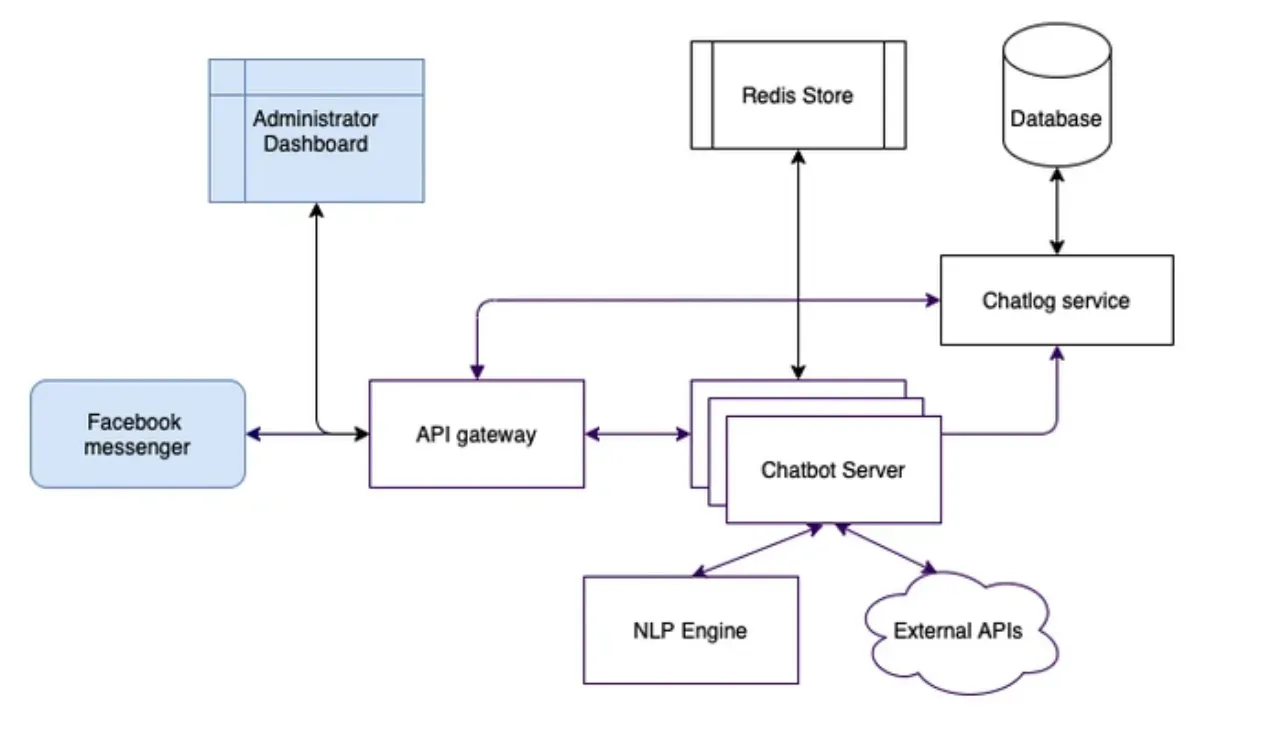
How you choose the right AI architecture for the use case depends on:
What to choose? Rule-Based vs. LLM-Based vs. Hybrid
Set the brand behind your AI chatbot to determine how much freedom you give the software to think for itself, compared to following a pre-written script.
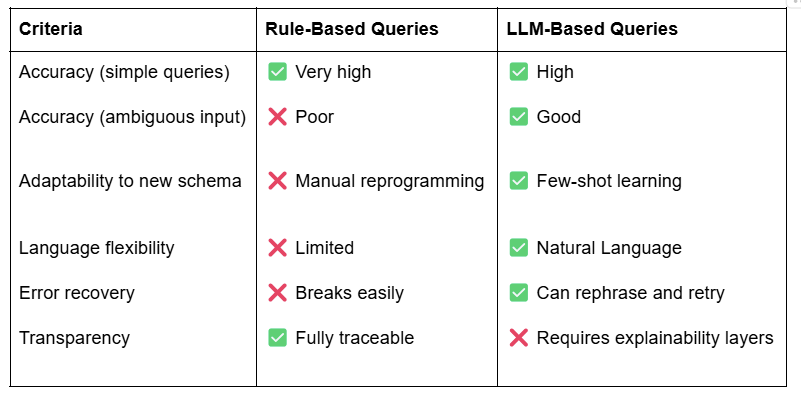
- Rule-Based: Works by steering conversion around a predefined path
- LLM-Based: Bot understands context before generating a response
- Hybrid Model: Uses an LLM to understand the user’s vague phrasing, then triggers a specific rule to handle high-stakes tasks like billing
When RAG is necessary
RAG is necessary when you want an AI chatbot to generate responses based on your business knowledge that’s available in your specific documents (PDFs, FAQs, Databases).
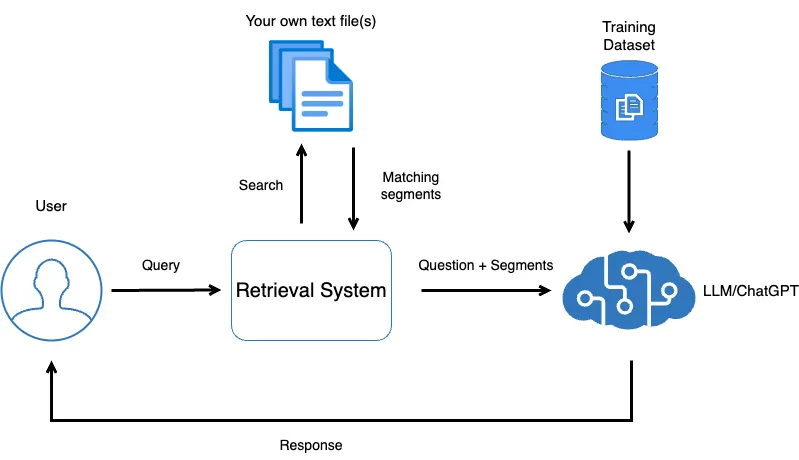
Scenarios where RAG is beneficial:
- Bot requiring answering from internal documents that change frequently
- Retraining the model whenever the knowledge base changes is not operationally viable.
- Businesses operate in regulated industries such as finance, legal, insurance, and healthcare, where hallucinated responses can expose them to liability.
Audi implemented RAG when their internal knowledge grew to a point where developers had to spend hours searching documentation to resolve a single ticket. RAG helped in pulling the most relevant content from Audi’s own Confluence documents in real time, cutting search time from hours to seconds.
API vs self-hosted deployment trade-offs
API deployment will have your chatbot calling an external model, such as OpenAI or Google, with their infrastructure handling the necessary work. Self-hosted means the model runs inside your own environment, on servers you control.
The decision to host your own AI (Self-Hosted) or rent someone else’s (API) is essentially a trade-off between convenience and control.
| Feature | Public API | Self-Hosted |
| Setup Time | Minutes You just plug in an API key. | Weeks/Months Requires hardware and specialised staff |
| Upfront Cost | Negligible | High Buy or lease GPUs and pay for energy |
| Data Privacy | Shared | Private Data never leaves your physical or virtual space |
| Performance | Access to state-of-the-art models | Limited to Open Source models |
Cost vs control decision matrix
Building a custom AI chatbot requires choosing an architecture that falls along a spectrum from low to high control and cost.
The right one depends on two things: your compliance exposure and your query volume.
Cost Vs. Control decision matrix for AI Chatbot Development
- Low cost / low control ⇢ Public API if your bot handles public info (e.g., What are your opening hours?)
- Medium cost / high control ⇢ RAG + Public API for internal policies
- High cost / full control ⇢ Self-host. Especially if the business functions in a regulated Industry (Finance, Healthcare), where PII (Personally Identifiable Information) must never leave your network
Step 4 – Design the Conversation Experience for Trust and Clarity
Building trust through chatbot conversation relies on accuracy and on how well it handles moments when it doesn’t have a perfect answer.
Even a single negative experience with a chatbot could drive 30% of customers away.
To build conversation experience:
Follow conversation flow design basics
Build a logic map that determines what the bot says, when it says it, and what happens next based on the user’s response by:
Embedding instructional constraints: Program the chatbot to avoid asking open-ended questions like “How can I help you?” which invite unpredictable inputs. Instead, choose intent-based buttons (e.g., Track Order, Refund Policy) to keep the user on a safe path.
Write for spoken language: Keep the bot responses easy-to-read by offering one idea at a time in shorter sentences. If a response needs more than three lines to make its point, break it into a follow-up exchange rather than a single long block.
Maintain transparency about AI behaviour
IBM’s 2025 UK study found that 63% of consumers want to retain transparency and control when AI makes decisions on their behalf. To drive transparency around AI communication:
Offer identity disclosure: Throw an opening message that clearly states what the bot is, what it covers, and how to reach a human.
Define explicit capabilities: Tell users what the bot cannot do immediately (e.g., “I can check stock, but I can’t process payments yet”) to prevent the guess-and-check cycle.
Communicate the data disclosure: Inform users that the conversation may be stored and used to improve our service, as the UK GDPR mandates this disclosure when the bot collects any personal data.
Manage hallucination risk
The risk of response hallucinations in AI is high when users can toss open-ended prompts. In return, AI can confidently produce a fluent response that may factually be wrong.
OpenAI’s GPT-4.5, released in February 2025, had a hallucination rate of 37.1% on the SimpleQA test.
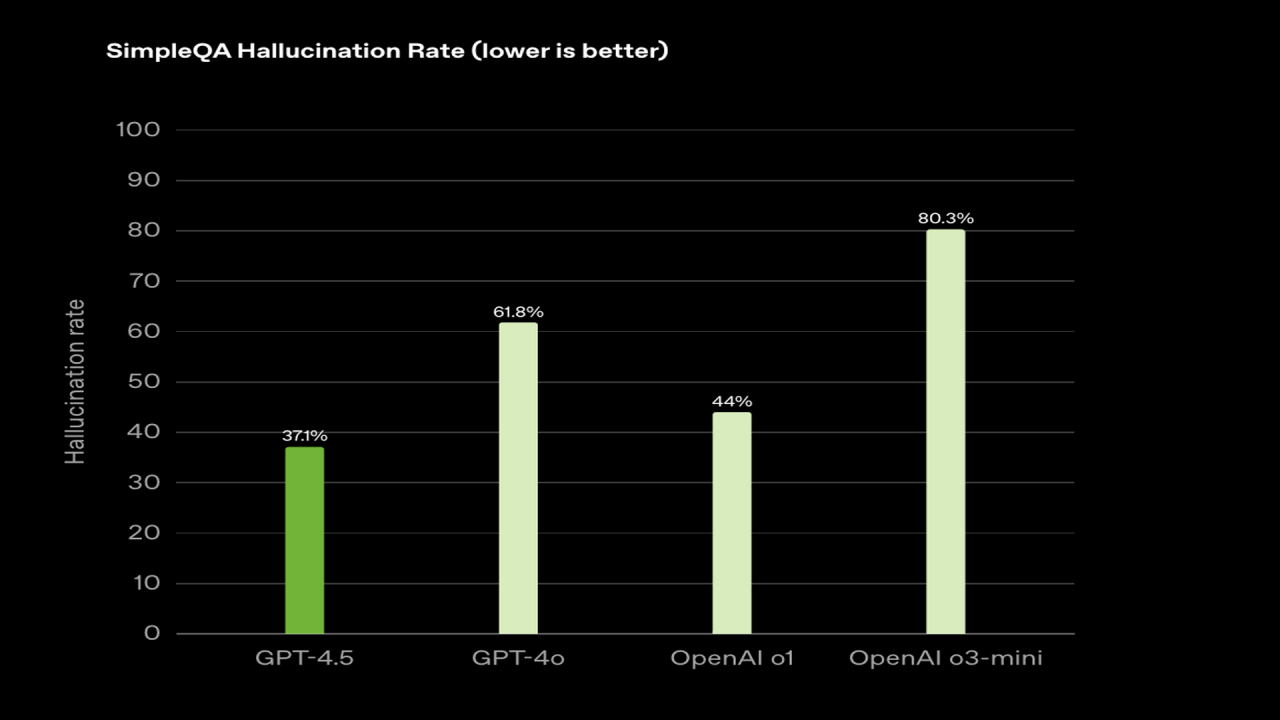
To minimise these hallucinations:
Ground responses in retrieved content: Let RAG pull answers from your actual documentation rather than letting the model generate from general knowledge.
Test with adversarial inputs before launch: Run queries specifically designed to push the bot outside its knowledge scope to analyse the responses it generates under pressure. It helps reveal where to tighten the barriers before actual users find those gaps.
Integrate fallback responses with human escalation logic
Create a safety net that prevents a user’s minor confusion from turning into brand abandonment.
A fallback that works does three things in one message:
- Acknowledges that the bot couldn’t help
- Explains why in plain terms
- Hands off context so the human agent doesn’t have to ask the same questions again
Step 5 – Prepare Data in Line with Governance and Compliance Foundations
IBM’s Cost of a Data Breach Report found that 63% of organisations lacked AI governance policies. A chatbot handling customer data without a governance structure falls into exactly that gap.
To manage the data your AI chatbot processes, build compliance from the start by:
Running data quality assessment
Wrong or garbage data produces confident-sounding fluffed responses, which, in a customer-facing context, is a liability that requires a check.
To ensure quality data:
- Audit the knowledge base by tagging the content as Gold (verified/current), Silver (needs review), or Trash (outdated). You can configure the RAG architecture to only pull from Gold sources.
- Correctly program your RAG by mapping every retrieval source:
- Help centre articles
- Product documentation
- Internal SOPs
- Pricing sheets
- Policy PDFs
- Support macros
Define data ownership and access control
Clearly define who owns each data source the bot will access, and who has permission to change it.
For example, every dataset inside your company already has invisible boundaries:
- Finance data → accounting
- Health records → clinical teams
- Customer contracts → legal
A bot retrieving across all of them without restriction creates a conversational backdoor into regulated information.
Make sure you confine the bot to:
Use Role-Based Access Control (RBAC): A bot facing a guest user should have a different data access scope than one facing a logged-in administrator.
Define an update protocol: Any change to a source document triggers a review before it is sent to the bot.
Map out logging and monitoring policies
Logs define how you catch problems before users report them, which is what requires a monitoring strategy. Because that’s how you’ll find out something went wrong when a customer complains, not when the failure first occurred.
Even from the compliance perspective, you cannot defend a bot’s decision in a UK court or a regulatory audit if you don’t have the logs.
A couple of best practices here include
Implementing policy to log intent match and confidence Score: Businesses often implement confidence-based routing mechanisms to identify what requires an immediate human handoff or clarification.
Run the JSON audit trail: let the logs store the raw JSON output at every step to see the next best intent.
Ensure security considerations
A customer-facing chatbot is a security threat. Users can attempt to extract information that the bot shouldn’t share or even inject prompts to make the bot behave outside its intended scope.
The UK’s National Cyber Security Centre (NCSC) has already warned that LLMs can be manipulated to leak data or perform unauthorised actions.
To prevent this:
Implement a sanitisation layer: It links users to the AI and removes malicious code or sensitive PII before it reaches the model.
Review vendor security: When using an API provider, verify their security certifications (SOC 2, ISO 27001) and confirm that their infrastructure aligns with your data residency requirements under UK law.
Step 6 – Build a Lean MVP Before Scaling
Gartner predicts that over 40% of AI projects will be canceled by 2027 due to over-scoping and a lack of clear value validation.
To avoid scope creep and impose certain governance, it is best to build a lean MVP before scaling the AI chatbot.
This build has four steps.
Define the smallest meaningful chatbot capability
Set a minimum scope that produces a measurable business outcome by —
- Pick one customer issue that you are trying to solve and offer the most predictable resolution path
- Writing down the complete conversation flow for that intent, including fallback and escalation logic
- Confirming the bot can handle that specific intent end-to-end before a second intent gets added to the backlog
Launch to a limited user segment
Run this as a controlled experiment by directing the chatbot at the user segment most likely to generate a clean, usable signal.
- Show the chat widget to 5%–10% of logged-in users or users on a specific low-stakes page (e.g., the FAQ page, not the Checkout page).
- Setting a volume ceiling for the first two weeks to drive enough conversations for generating statistically meaningful data.
Validate metrics against baseline
Compare the bot’s performance to your existing human or rule-based metrics.
A good start would be to set the containment rate (~ 60% to 70%) and CSAT score (4.5/5), which determines how well a chatbot can resolve customer inquiries without human input.
Also, set up a baseline such that if a human handles a request in 5 minutes, but the bot solves it in 2 minutes while maintaining 90% positive feedback, the system is ready for full release.
Gather Structured Feedback
Use MVP to identify the issues you can address before rolling out the full chatbot by collecting structured feedback.
Perform a rationale audit: For every No, have a human review the transcript to determine whether the failure was due to bad data (the bot had the wrong info) or bad reasoning (the bot had the info but misinterpreted it).
Review the full conversation transcript: Check for conversations where users got an answer but rephrased the same query 3 times before the bot understood, and that’s where your next flow fix exists.
Step 7 – Deploy, Monitor, and Optimise Continuously
Once you’re done building an AI chatbot, the next step is to monitor it after deployment because it requires regular updates to stay accurate.
Some of the major steps post the AI chatbot deployment are as follows:
Tracking Production KPIs
The moment you deploy a chatbot, start:
- Measuring latency, the actual speed of the bot
- Success rate based on how often it finishes a job without help
- Defining the cost per Interaction by tracking the spend on API tokens or servers
Monitoring Abnormal Behaviour
Set up automated alerts if the bot deviates from standard responses or if there’s a sudden surge in the escalation rate or session abandonment.
Implement this by using native analytics in platforms like Intercom. You can even pipe logs into Datadog and Looker Studio for custom alert rules.
Refine Prompts Iteratively
The chat logs can help find if the bot’s instructions are unclear to —
- Review underperforming intents weekly and rewrite their prompts based on actual conversation transcripts, not assumptions.
- Test prompt changes against a held-out set of real queries before pushing to production.
Measure long-term ROI impact
Move beyond chat metrics to business metrics by comparing your total support spend and customer retention rates from before the launch to six months after. This proves whether the bot is actually protecting your profit margins or just acting as a digital distraction.
For basics:
- Track support ticket deflection monthly against your pre-bot baseline
- Measure agent time freed — convert hours saved into a cost figure using your average agent hourly cost
- After some months, run a full cost-benefit review of the total build and running cost against deflection savings.
Conclusion: From Chatbot Idea to Production-Ready System
Creating a successful AI chatbot requires a shift from general automation to business-specific logic.
Now that you know how to create an AI chatbot, the next step is deciding whether you’re going with a plug-and-play platform or building a custom solution from the ground up. It can also affect the cost of an AI chatbot and the scalability you aim to unlock with it.
If you’re unsure, consult the AI development service expert who helps you set momentum in the right direction.